Understanding Network Devices
What is a Modem and how it connects your network to the internet?
Lets first start with basic overview:
Internet (ISP) -> Modem -> Router -> Firewall -> Load Balancer -> Switch -> Devices/Servers Think: how the public network enters a building and is handed off, secured, and directed to occupants.Now, lets understand definition of Modem, Here firstly It convert ISP physical/line signals (DSL/Coax/Fiber) into digital Ethernet and establish the link to your ISP (often gets a public IP). Analogy: the building's main gate that accepts the highway connection and hands packages into the building.
What is a Router and how it directs traffic?
Now coming to Router here it route IP packets between networks (WAN <-> LAN), perform NAT, run routing protocols, assign DHCP (often combined with NAT).
Analogy: traffic police at intersection deciding where each car goes.
Router vs Modem: modem = line termination; router = decision-maker for IP traffic and network boundaries.Switch vs Hub: how local networks actually work?
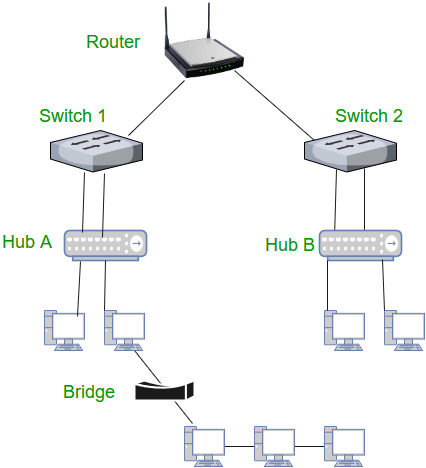
Hub: repeats every frame to all ports (broadcast); single collision domain (old, mostly obsolete). Switch: learns MAC addresses and forwards frames only to destination port (reduces collisions, isolates flows). In more depth hub = loudspeaker that repeats everyone's message to the whole room; switch = receptionist who sends a message only to the right person.
When to use: always prefer switches in modern networks.
 Mermaid diagram (hub vs switch)
 ```mermaid
 graph LR
     subgraph Hub
       H1[Dev A] --> Hub[Hub]
       H2[Dev B] --> Hub
       Hub -->|broadcast| H1
       Hub -->|broadcast| H2
       Hub -->|broadcast| H3
       H3[Dev C]
     end

     subgraph Switch
       S1[Dev A] --> Switch[Switch]
       S2[Dev B] --> Switch
       S3[Dev C] --> Switch
       Switch -->|direct to MAC| S2
       Switch -->|direct to MAC| S3
     end
What is a Firewall and why security lives here?
Here, firewall ensures enforce security policies by allowing/denying traffic; can operate as packet filter, stateful firewall, or application firewall (WAF).
Analogy: security gate checking IDs and the contents of packages.
Placement: at network boundary (between router and internal network or DMZ), also between tiers (app <> DB). Security lives here.
Below is the basic structure to the firewall:
     Internet --> Modem
      Modem --> Router
      Router --> Firewall
      Firewall --> InternalSwitch
      InternalSwitch --> Servers[Servers / Workstations]
What is a Load Balancer and why scalable systems need it?
Load balancer is the distribute incoming connections across multiple backend servers, perform health checks, sometimes TLS termination and sticky sessions.
Analogy: toll booth dispatcher sending drivers to available lanes to avoid congestion.
Types: DNS-based, L4 (IP/port), L7 (HTTP) reverse-proxy. Critical for scaling and high availability.Internet --> LB[Load Balancer] LB --> S1[App Server 1] LB --> S2[App Server 2] LB --> S3[App Server 3] S1 --> DB[(Database)] S2 --> DB S3 --> DBHow all these devices work together in a real-world setup?
High-level view (concise) Internet -> ISP handoff/ONT/Modem -> Edge Router -> Perimeter Firewall / WAF -> Load Balancer -> L2/L3 Switches -> Servers / VMs / K8s Nodes -> Internal firewalls / DB VLANs
Real world example think as: public highway arrives at the building gate (modem/ONT), a traffic controller routes vehicles (router), a security gate inspects them (firewall), a dispatcher sends cars to free lanes (load balancer), and building corridors (switches/VLANs) connect rooms (servers).
In a real-world production deployment, the devices form a chain to keep your backend system running smoothly. Here is the End-to-End path of a request:
The Request: A user types your URL. This request travels through their Modem and Router into the public internet.
The Entry: The request hits your company's Firewall. The firewall checks if the request is safe.
The Distribution: Once inside, the request hits a Load Balancer. It decides which of your 10 backend servers should handle this specific user.
The Internal Move: A Switch inside the data center physically moves the data from the Load Balancer to the specific Backend Server.
The Response: The server processes the code (e.g., fetching a profile from a database) and sends the data back through the switch, out the firewall, and across the internet to the use
The below architecture is why backend developers must build "stateless" applications. Since a Load Balancer might send a user's first request to Server A and their second to Server B, your code cannot rely on data being saved in the memory of just one specific server.
Comments
Join the discussionNo comments yet. Be the first to comment.